
Table of Contents
- How to Reduce Office Energy Costs: Start With an Energy Audit
- Optimize HVAC Systems and Thermostat Programming
- Lighting Controls and Occupancy Sensors
- Reduce Phantom Load and Standby Power in the Workplace
- Select Best Energy Efficient Office Equipment
- Calculate ROI and Financial Payback Periods
- Implement Building Management Systems and Smart Controls
- Drive Employee Behavioral Changes and Operational Efficiency
Last Updated: August 4, 2026
How to Reduce Office Energy Costs: Start With an Energy Audit
Understanding how to reduce office energy costs begins with visibility into where your energy actually goes. An energy audit reveals which systems consume the most power, where inefficiencies hide, and which upgrades deliver the fastest return on investment. Most offices waste energy predictably: HVAC systems running longer than necessary, lights left on in unoccupied spaces, and equipment drawing phantom power when idle. According to U.S. Department of Energy guidance on commercial building efficiency, a structured audit typically uncovers 10-30% of potential savings without major capital investment.
What an energy audit reveals
A comprehensive energy audit documents your building’s current performance across every major system. You’ll learn kilowatt-hour consumption by month, identify peak demand periods, and see which equipment consumes the most power. The audit covers HVAC systems, lighting infrastructure, plug loads from computers and office equipment, water heating, and specialized equipment. It also flags thermal insulation issues, air leakage, and building envelope problems that force HVAC systems to work harder.
Request a utility bill analysis before the audit. Your electric and gas bills contain demand patterns that guide where auditors should focus. Peak demand charges often represent 30-50% of commercial energy costs.
DIY audit versus professional assessment
A DIY audit costs nothing and works well for smaller offices. Walk through your building with a checklist: note thermostat settings, count occupancy sensors, check for lights left on, identify equipment without sleep mode enabled. A professional energy audit costs more but delivers deeper insight using thermal imaging cameras and specialized equipment. The professional route makes sense if your office occupies more than 5,000 square feet or your energy bills exceed $2,000 monthly. For smaller offices, a DIY audit followed by targeted fixes often delivers better ROI.
Optimize HVAC Systems and Thermostat Programming
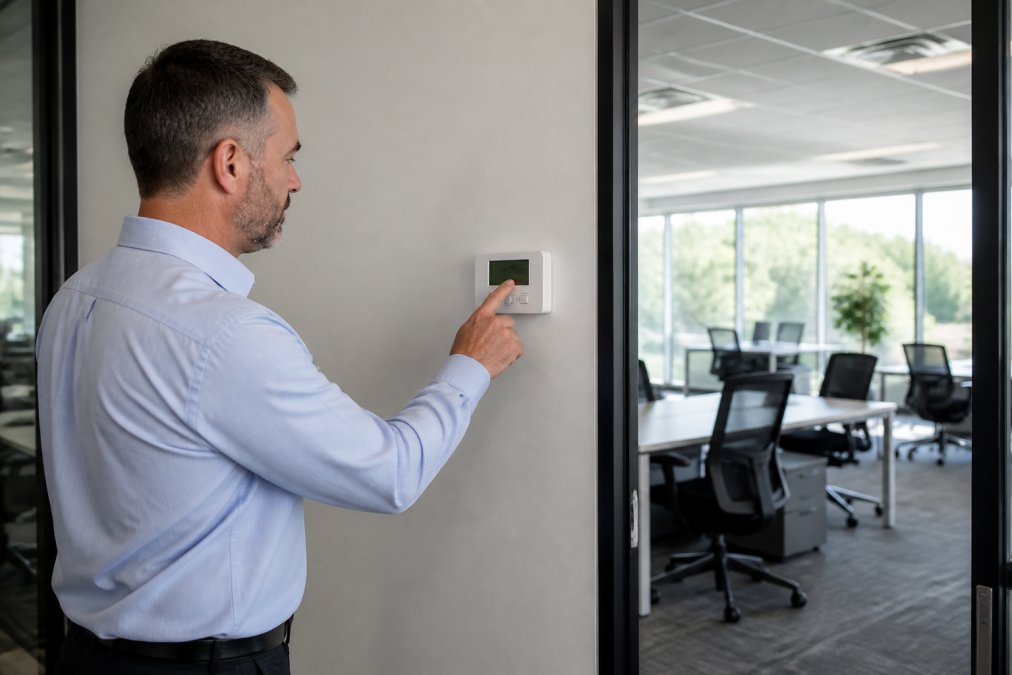
HVAC systems typically account for 40-50% of total office energy consumption. Optimizing thermostat programming and maintenance routines is one of the fastest ways to reduce office energy costs. Even a two-degree adjustment in setpoint temperatures can lower energy use by 3-5% annually.
Thermostat scheduling and setback strategies
Effective thermostat programming follows your occupancy pattern. During business hours, maintain setpoints that keep employees comfortable: typically 72°F in cooling season and 70°F in heating season. During unoccupied periods, allow temperatures to drift 4-6 degrees away from comfort range. A typical schedule: weekday mornings warm to 70°F at 6 AM, maintain that through business hours, drop to 62°F at 6 PM, and hold there overnight. A basic programmable thermostat costs $150-300 and saves 10-15% on heating and cooling costs annually, with payback typically within 18-24 months.
Setback temperatures that are too aggressive can create comfort complaints. Start with 4-degree setbacks and adjust based on occupant feedback.
HVAC maintenance and peak demand reduction
Well-maintained HVAC systems run efficiently. Schedule maintenance twice yearly: spring tune-up before cooling season and fall tune-up before heating season. A professional inspection includes filter replacement, coil cleaning, refrigerant charge verification, and system performance testing. This preventative approach costs $150-300 per visit but prevents the 15-20% efficiency loss that occurs with neglected equipment.
Peak demand management is equally important. Many utilities charge based on your highest 15-minute power draw during the billing period. Reduce peak demand by staggering equipment startup so multiple HVAC zones don’t cycle on simultaneously.
Lighting Controls and Occupancy Sensors
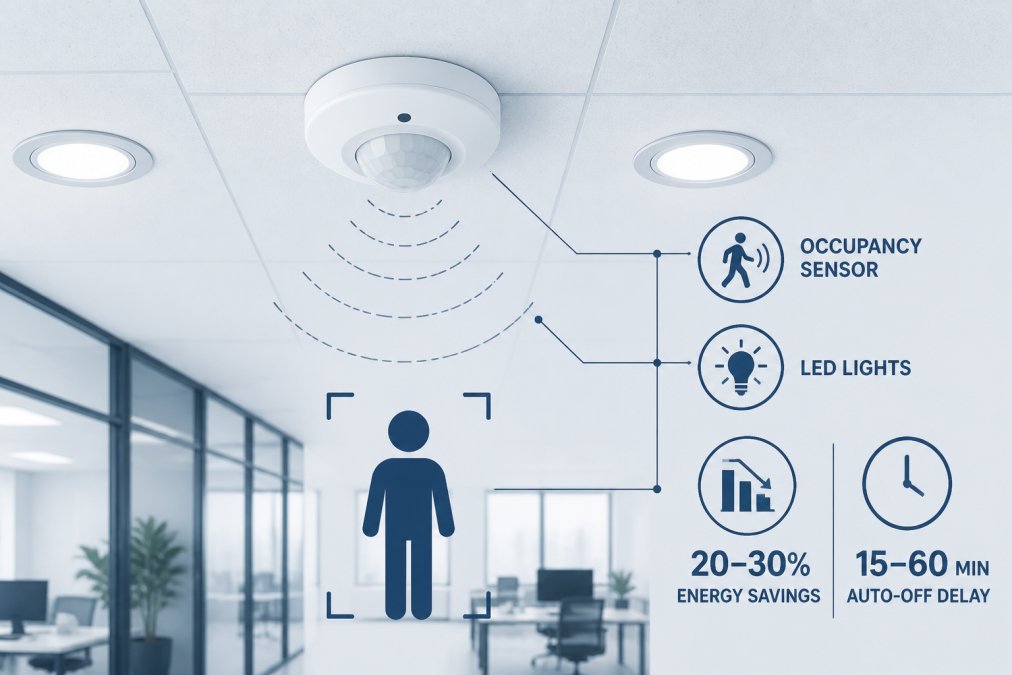
Lighting represents 15-25% of typical office energy consumption. Upgrading to LED fixtures and installing occupancy sensors can reduce this load by 50-70% without sacrificing illumination quality. Modern LEDs deliver superior light quality, longer lifespan (50,000+ hours), and 75-80% energy savings compared to incandescent bulbs. A typical office using 100 fluorescent fixtures consuming 40 watts each can reduce that to 1,000 watts with LED equivalents, saving roughly 26,000 kilowatt-hours annually, a reduction worth $2,600-3,500 depending on local utility rates.
LED upgrades and daylighting strategies
Daylighting strategies amplify LED savings. Offices with windows can reduce artificial lighting during daylight hours by using dimming controls that adjust LED brightness based on available natural light. This approach saves an additional 10-20% on lighting energy while improving employee wellbeing.
Bi-level switching and sensor installation
Bi-level switching uses two circuits to control lights independently, allowing occupants to turn off perimeter lights while maintaining work-area illumination. Occupancy sensors automate this further by detecting when a space is unoccupied and automatically switching lights off. For conference rooms, break rooms, and storage areas, occupancy sensors typically reduce lighting energy by 20-40%. Installation costs $50-150 per sensor, with payback within 2-3 years.
Reduce Phantom Load and Standby Power in the Workplace
Office equipment consumes power even when idle or in sleep mode. This standby power accounts for 5-10% of total office energy consumption. In a typical office with 50 computers, 20 monitors, 10 printers, and miscellaneous chargers, phantom loads can consume 1,000-2,000 watts continuously.
Identifying energy vampires in your office
Energy vampires are devices that draw significant power even when off or idle. Common culprits include desktop computers and monitors left on overnight, printers in sleep mode, copiers on standby, phone chargers plugged in without devices, and coffee makers. A simple audit identifies these devices by walking through your office after hours and noting what’s plugged in. Use a power meter (available for $20-40) to measure actual consumption of suspect devices.
Standby power runs 24/7. A device drawing 10 watts continuously costs roughly $10-15 annually in electricity. Multiply that by dozens of devices, and phantom load becomes a significant expense.
Smart plugs and power management solutions
Smart plugs cut power to devices when they’re not in use, sitting between the wall outlet and the device and switching off automatically based on a schedule or occupancy detection. Smart plugs cost $15-40 each and work well for peripherals: printers, coffee makers, phone chargers, and other devices that don’t need continuous power. For computers, enable built-in power management features to sleep after 15 minutes of inactivity and shut down completely at end of business hours. Power strips with occupancy sensors provide another option, detecting motion in a room and cutting power to all connected devices when the space is empty.
Select Best Energy Efficient Office Equipment
When replacing office equipment, ENERGY STAR certification signals efficiency. ENERGY STAR certified computers, monitors, printers, and copiers consume 20-30% less energy than non-certified equivalents while delivering identical performance.
ENERGY STAR certified computers and printers
Desktop computers certified by ENERGY STAR consume 40-50 watts during active use, compared to 80-120 watts for non-certified models. Over a year, a single computer uses roughly 350 kilowatt-hours less electricity, a savings of $35-50 annually. A 20-person office replacing all computers with certified models saves $700-1,000 yearly. Laptop computers are inherently more efficient, typically consuming 15-30 watts during use. ENERGY STAR certified multifunction devices use 20-30% less energy than conventional models and enter sleep mode more aggressively.
Sleep mode and shutdown procedures
Modern equipment enters sleep mode automatically after a period of inactivity, but default settings often allow 30-60 minutes before activation. Reduce this to 10-15 minutes. Create an office shutdown checklist for end-of-day procedures ensuring computers enter sleep mode or shut down completely, monitors power off, printers enter sleep mode, and non-essential equipment powers down.
Calculate ROI and Financial Payback Periods
Understanding the financial case for energy efficiency upgrades helps prioritize investments. The basic formula is straightforward: divide the upgrade cost by annual energy savings. A $3,000 LED retrofit that saves 5,000 kilowatt-hours annually (at $0.12/kWh, that’s $600 savings) has a 5-year payback.
Understanding kilowatt-hour costs and utility bills
Your utility bill shows consumption in kilowatt-hours and cost per kWh. Commercial rates typically range from $0.08-0.15 per kilowatt-hour depending on location and utility. Maryland, DC, and Northern Virginia rates average $0.11-0.13 per kilowatt-hour for commercial customers. Many utilities impose demand charges based on your highest 15-minute power draw during the billing period, adding 20-40% to total energy costs.
Calculate your total annual energy cost by multiplying consumption by your effective rate. If your office uses 100,000 kWh annually at an effective rate of $0.12/kWh, your annual bill is $12,000. A 10% reduction saves $1,200 yearly.
Offices with annual energy bills exceeding $15,000 should conduct a professional audit. The audit typically costs $1,500-3,000 but often qualifies for utility rebates. For smaller offices with bills under $10,000, a DIY audit followed by targeted, low-cost fixes delivers better ROI.
Payback timelines for common upgrades
Occupancy sensors for lighting: $1,500-3,000 installed. Saves 20-40% of lighting energy. Payback: 2-3 years.
LED lighting retrofit: $2,000-5,000 for 100+ fixtures. Saves 60-75% of lighting energy. Payback: 3-4 years.
Programmable thermostats: $300-800 installed. Saves 10-15% of HVAC energy. Payback: 18-24 months.
Building management system: $5,000-15,000 depending on building size. Payback: 4-6 years.
HVAC system replacement: $8,000-20,000 depending on capacity. Saves 20-30% of heating and cooling energy. Payback: 5-8 years.
Prioritize upgrades with payback periods under 3 years.
Implement Building Management Systems and Smart Controls
Advanced building management systems (BMS) integrate HVAC, lighting, occupancy sensors, and power management into a single platform. A BMS collects data from all building systems, identifies optimization opportunities, and automates control decisions. For larger offices, a BMS typically reduces total energy consumption by 15-25%.
Centralized monitoring and load shedding
A BMS dashboard displays real-time energy consumption by system, floor, or zone. This visibility alone drives behavior change. Load shedding is an advanced BMS capability. During peak demand periods when utility rates spike, a BMS automatically reduces non-critical loads by dimming non-essential lighting, raising cooling setpoints, or delaying water heating. These micro-adjustments reduce peak demand by 10-20% without noticeably affecting occupant comfort. Demand response programs offered by many utilities provide incentives for load shedding, generating $5,000-20,000 annually for commercial buildings.
Integration with hybrid and remote work schedules
Modern offices operate with hybrid and remote work schedules. A smart BMS adapts dynamically. Occupancy sensors feed real-time data to the BMS. If a floor is 20% occupied on a given day, the BMS automatically reduces HVAC setpoints, dims non-essential lighting, and adjusts ventilation rates based on actual occupancy. Some advanced systems integrate with building access cards or mobile apps to anticipate occupancy and pre-condition the building accordingly.
At Anthony & Son Indoor Air Quality, LLC, we help commercial property managers integrate building management systems with existing HVAC infrastructure. Our certified technicians ensure BMS integration doesn’t compromise system performance while maximizing energy savings through optimized control strategies.
Drive Employee Behavioral Changes and Operational Efficiency
Technology and equipment upgrades address 60-70% of energy waste. The remaining 30-40% comes from human behavior: leaving lights on, setting thermostats to uncomfortable extremes, leaving equipment powered on overnight, and operating without awareness of energy consumption. Behavioral change requires three elements: awareness, accountability, and incentive.
Training and accountability programs
Start with education. Hold a brief meeting explaining how energy costs affect the business. Show your energy bill and break down consumption by system. Explain that reducing energy consumption by 10% saves $X annually. Provide a simple checklist of daily behaviors: turn off lights when leaving a room, close office doors, enable computer sleep mode, unplug chargers when not in use, report equipment left running overnight. Make energy conservation visible by installing a real-time energy dashboard in a common area showing current consumption and comparison to targets. Designate an energy champion who monitors consumption and sends monthly updates to staff.
Measuring carbon footprint and sustainability impact
Translate energy savings into environmental impact. One kilowatt-hour of electricity produces roughly 0.9 pounds of CO2 emissions. If your office reduces consumption by 10,000 kWh annually, that’s 9,000 pounds of CO2 avoided, equivalent to removing a car from the road for a year. Publish these metrics in company newsletters. Track progress monthly and share results with staff.
Reducing office energy costs requires a systematic approach combining technology, operational changes, and behavioral shifts. Start with an energy audit to identify your biggest opportunities. Implement quick-win upgrades like programmable thermostats and occupancy sensors while planning longer-term investments in LED lighting and building management systems. Most offices can reduce energy consumption by 15-25% through a combination of these measures, generating savings of $2,000-10,000 annually depending on building size and current efficiency. Payback periods for most upgrades fall within 3-5 years, after which savings flow directly to profitability.
At Anthony & Son Indoor Air Quality, LLC, we help commercial property managers and business owners throughout Maryland, DC, and Northern Virginia implement comprehensive energy efficiency strategies. Our certified HVAC technicians optimize heating and cooling systems for peak efficiency, and we can connect you with energy auditors and building management system integrators to complete your efficiency roadmap. Contact us today to discuss how we can help your office reduce energy costs while improving comfort and indoor air quality for your team.
Frequently Asked Questions
How much can I actually save by reducing office energy costs?
Savings depend on your current usage, equipment age, and which measures you implement. A comprehensive approach combining HVAC optimization, LED lighting, occupancy sensors, and smart controls typically reduces utility bills by 15-30%. Specific payback periods vary: LED upgrades often pay for themselves in 2-4 years, while programmable thermostats may break even in 1-2 years. Contact Anthony & Son Indoor Air Quality for a professional energy audit to estimate your potential savings based on your facility's actual consumption patterns.
What's the best way to start reducing phantom energy load in the workplace?
Begin by identifying which devices consume standby power: printers, monitors, copiers, and chargers are common culprits. Smart plugs can cut phantom load by 75-90% by automatically powering down devices when not in use. Establish shutdown procedures requiring employees to turn off equipment at day's end, and configure sleep mode on all computers. For offices in the DC metro area, Anthony & Son can assess your current power management setup and recommend targeted solutions that fit your operational needs.
Should I hire a professional for an office energy audit, or can I do it myself?
A DIY audit helps identify obvious issues like broken seals, outdated lighting, or thermostat problems. However, a professional energy audit provides detailed kilowatt-hour consumption data, identifies hidden inefficiencies in HVAC systems, and quantifies potential ROI for each upgrade. Professionals use specialized equipment to measure actual energy use and thermal performance. For commercial properties in Maryland, DC, and Northern Virginia, Anthony & Son offers comprehensive energy assessments that guide cost-effective improvements and help prioritize investments for maximum operational efficiency.
How does hybrid and remote work affect office energy costs?
Hybrid schedules reduce occupancy, lowering heating, cooling, and lighting needs on days when fewer employees are present. However, many offices fail to adjust HVAC schedules or lighting controls accordingly, wasting energy on empty spaces. Smart building management systems can automatically reduce load during low-occupancy periods. Implementing occupancy sensors and demand-controlled ventilation ensures your HVAC system adapts to actual usage. Anthony & Son helps facility managers optimize systems for fluctuating occupancy patterns, ensuring you reduce office energy costs even as work schedules change.
This article was written using GrandRanker