
Table of Contents
- When to Reset Your Thermostat (and When Not To)
- Identify Your Thermostat Before You Reset
- How to Soft Restart Your Smart Thermostat
- How to Factory Reset Your Smart Thermostat
- Smart Thermostat Power Cycling: The Full System Reset
- AC Not Cooling Troubleshooting After a Reset
- Post-Reset Configuration: Getting Your Settings Back
- When to Call an HVAC Professional
- Frequently Asked Questions
Last Updated: September 27, 2026
When to Reset Your Thermostat (and When Not To)
Knowing how to reset smart thermostat settings is the first thing many homeowners try when the AC stops cooling, but it fixes the wrong problem about half the time. Reset when the screen is frozen, the app won’t connect, or settings won’t save. Don’t reset when the system is just slow to cool, that’s a mechanical issue a reset will never touch.
- Reset the thermostat: frozen display, unresponsive buttons, Wi-Fi drops, app sync failures
- Don’t reset the thermostat: weak airflow, warm air from vents, ice on the outdoor unit, strange noises
- Reset after: a power outage, a firmware update, or moving the unit to a new wall location
Identify Your Thermostat Before You Reset
The reset method changes by model, and forcing the wrong one can wipe your schedule for nothing.
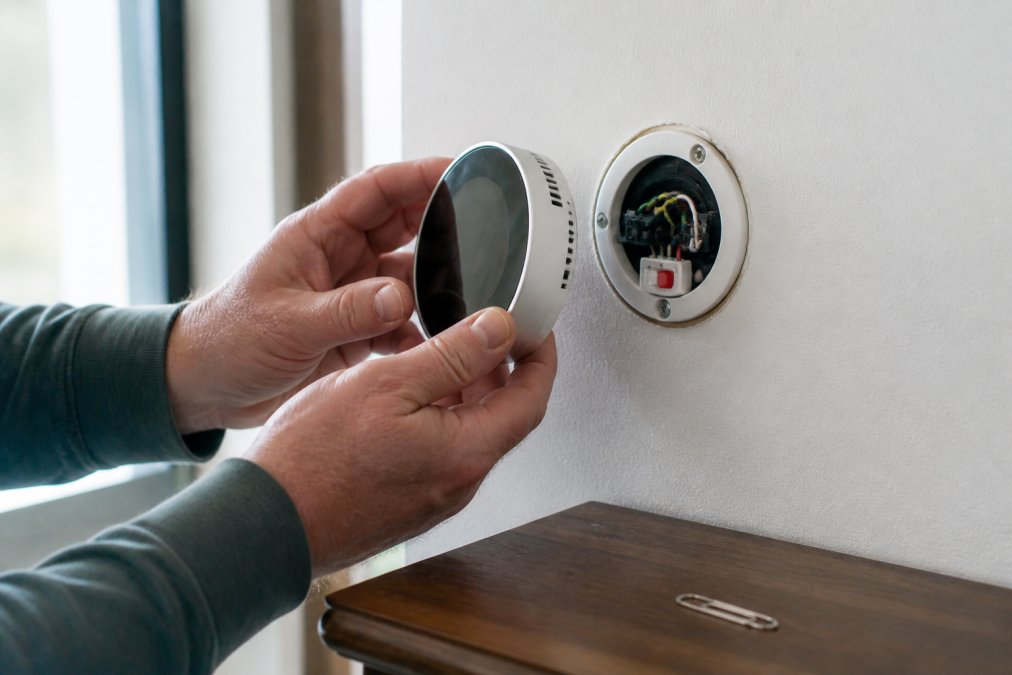
Then look for these clues:
- Recessed button: a tiny pinhole, often labeled “Reset” or “R”, you’ll need a paper clip
- Menu-based reset: most touchscreen models hide the option under Settings or Advanced
- No visible button: some units reset only through the app or by cutting power
Never pull a thermostat off the wall while the HVAC system is running. The low-voltage wiring behind it can short against the housing, which can blow the fuse on your furnace control board and leave you with no heat or cooling at all.
How to Soft Restart Your Smart Thermostat
A soft restart is the safest first move and fixes most glitches in under a minute, rebooting the software without erasing your schedules, Wi-Fi credentials, or temperature settings. Try this first:
- Open the thermostat menu on the display screen
- Find Settings, then look for Restart or Reboot
- Confirm the restart and wait 60 seconds
- Watch for the display to cycle back on
- Check that the app reconnects on its own
How to Factory Reset Your Smart Thermostat
A factory reset wipes the thermostat back to its out-of-box state. Use it when a soft restart fails, when the unit is stuck in a boot loop, when you’re handing the home to a new owner, or when the thermostat has moved to a different HVAC system. It is the nuclear option, and it is overused. Know what gets erased versus what survives:
- Erased: Wi-Fi credentials, the mobile app pairing, the 7-day schedule, away/vacation modes, geofencing rules, sensor calibration offsets, and any learned recovery-rate data
- Usually preserved: the thermostat’s firmware version and its factory sensor calibration baseline
- Not affected at all: the HVAC equipment itself, the air handler, condenser, and control board keep their own fault history and settings
Step-by-step
- Photograph your current schedule, setpoints, and any custom away modes before you touch anything
- Enter the menu interface and open Settings (sometimes labeled Advanced or Installation Settings)
- Select Reset, then Factory Reset, Restore Defaults, or Reset All Settings, the wording varies by brand
- Confirm when the screen warns that settings will be erased
- Wait for the unit to power down and restart; this can take 60 to 90 seconds
- Reconnect the thermostat to your Wi-Fi network
- Rebuild your schedule from your notes or photos
Model-specific reset methods
The menu path only works on touchscreen models. Here’s how the three common hardware types reset:
- Touchscreen models (menu-based): the Settings > Reset > Factory Reset path above. No hardware interaction needed.
- Recessed pinhole button: press and hold with a paper clip or the tip of a pen for 10 to 15 seconds. The screen will blank, then return to the initial setup wizard. Do not release early, releasing at 5 seconds often triggers a soft restart instead of a full wipe.
- No visible button, app-only models: some units can only be factory reset through the manufacturer’s mobile app or by removing the thermostat from the wall plate and holding the internal reset contact. Check the manual before pulling the unit, because the wiring order matters when you reinstall it.
The re-pairing failure most people hit
After a factory reset, the most common problem is that the thermostat won’t rejoin the Wi-Fi network. It’s almost always one of three things:
- The network is 5 GHz and the thermostat only supports 2.4 GHz, most smart thermostats are 2.4 GHz only
- The router has band steering enabled, which hides the separate 2.4 GHz SSID
- The Wi-Fi password was changed since the thermostat was last connected
Take a photo of your old schedule and settings with your phone before any factory reset. Rebuilding a 7-day schedule from memory takes far longer than most people expect, and you’ll lose any custom away or vacation modes. A photo of the old setpoints also lets you spot a schedule that was contributing to the cooling problem in the first place.
Do not factory reset a thermostat that is still under a manufacturer warranty without checking the terms first. Some manufacturers treat repeated factory resets as evidence of a hardware fault and will replace the unit, but only if the fault is documented. Wiping the unit can erase the diagnostic log a technician would use to confirm the defect.
Smart Thermostat Power Cycling: The Full System Reset
Smart thermostat power cycling means cutting power to the entire HVAC system, not just the wall unit. It clears glitches a thermostat-only reset can’t reach. If the control board is holding a fault, resetting the screen alone won’t clear it.
Here’s the safe sequence:
- Switch the thermostat to Off at the control panel
- Find your circuit breaker and flip the breaker labeled for the AC or furnace
- Wait a full 5 minutes, not 30 seconds
- Flip the breaker back on
- Power the thermostat back up and let it boot
- Set it to Cool and give it 10 minutes to respond
Never reset the breaker while the system is actively running. Compressors need a few minutes of off-time to equalize pressure, and restarting too soon can trip the internal overload or shorten the compressor’s life.
AC Not Cooling Troubleshooting After a Reset
If the reset didn’t fix your cooling problem, the thermostat was never the issue, useful information, because it narrows the list fast.
Work through these checks before you call anyone:
- Check the air filter. A clogged filter is the most common cause of weak cooling. Replace it if it looks gray or matted.
- Look at the outdoor unit. Ice on the copper lines points to low refrigerant or restricted airflow. Turn the system off and let it thaw.
- Check the breaker again. A tripped breaker that won’t stay on signals an electrical fault, not a thermostat problem.
- Check the error codes. Many systems flash a code on the control board. Write it down before you call for service.
- Check the vents. Closed or blocked registers in one room can make the whole system feel like it’s failing.
Post-Reset Configuration: Getting Your Settings Back
Reconnecting after a reset takes longer than the reset itself, so budget 15 to 20 minutes. The table below is the order that works, because each step depends on the one before it.
| Step | What to Do | Time Needed |
|---|---|---|
| 1 | Reconnect the thermostat to Wi-Fi | 2-3 minutes |
| 2 | Link the mobile app to the device | 2 minutes |
| 3 | Set system type (AC, heat pump, or dual fuel) | 1 minute |
| 4 | Rebuild the 7-day schedule | 5-8 minutes |
| 5 | Re-enable smart home integration | 2-3 minutes |
| 6 | Run a test cycle in Cool mode | 10 minutes |
Re-pairing Wi-Fi: the step that fails most often
If the thermostat won’t rejoin the network, the cause is almost always the radio band. Most smart thermostats ship with a 2.4 GHz-only Wi-Fi radio, while many routers broadcast one merged name for 2.4 GHz and 5 GHz. The thermostat sees the network but can’t complete the handshake.
Fix it in this order:
- Confirm the thermostat’s Wi-Fi spec in the manual, if it says 2.4 GHz only, that’s your answer
- Log into the router and temporarily disable band steering, or create a separate 2.4 GHz SSID
- Re-run the thermostat’s Wi-Fi setup and select the 2.4 GHz network
- Once connected, you can usually re-enable band steering without dropping the device
Recalibrating the sensor and recovery rate
A thermostat doesn’t read your home’s temperature instantly after a reset. It runs a calibration cycle, and the displayed temperature can be off by a degree or two, normal, not a defect. Two things recalibrate over the first 24 to 48 hours:
- The temperature sensor offset, the thermostat compares its onboard sensor against its own baseline and adjusts
- The recovery rate, the system learns how long it takes to reach a setpoint from a given outdoor temperature, which drives when it starts pre-cooling before a scheduled event
The system type setting is the one that causes real damage
If the system type is set wrong, the thermostat may run the fan without the compressor, or short-cycle in heating mode. On a heat pump, a wrong system type can energize the reversing valve incorrectly and run the system in the wrong mode. Confirm the setting against your equipment nameplate before you walk away.
When NOT to reset, the warning most guides skip
A reset is not free. Every factory reset erases the diagnostic log a technician would use to trace an intermittent fault, and repeated resets can mask a mechanical problem long enough for the damage to get worse.
Do not reset when:
- The system is cooling slowly but the thermostat responds normally, that’s airflow or refrigerant, not software
- You see ice on the outdoor unit or refrigerant lines, turn the system off and let it thaw; a reset won’t help and running it iced can damage the compressor
- The breaker trips again immediately after reset, that’s an electrical fault, and resetting repeatedly can damage the control board
- The thermostat is under warranty and the fault is intermittent, call for service first so the diagnostic log is preserved
When to Call an HVAC Professional
Call a licensed HVAC technician when the thermostat resets cleanly but the system still won’t cool, or when you see ice, hear grinding, or smell burning. Those are mechanical and electrical problems, not software ones. Stop troubleshooting and pick up the phone when:
- The breaker trips again right after you reset it
- The outdoor unit hums but the fan never spins
- You see ice on the refrigerant lines or the coil
- The system short-cycles every few minutes
- You smell burning near the air handler
- The thermostat won’t hold a Wi-Fi connection after several resets
Frequently Asked Questions
Will resetting my thermostat fix my AC?
A reset can fix AC problems caused by software glitches, frozen displays, or lost Wi-Fi connectivity. It will not fix low refrigerant, a failed compressor, a tripped circuit breaker, or clogged filters. If your AC still will not cool after a reset and a power cycle, the issue is likely mechanical or electrical. In that case, a licensed technician should inspect the system rather than repeating resets.
Does a factory reset delete my smart thermostat settings?
Yes. A factory reset erases schedules, temperature preferences, geofencing rules, and Wi-Fi credentials. Before resetting, take a photo of your current schedule and note your preferred temperatures. After the reset, you will need to reconnect the thermostat to Wi-Fi and rebuild your settings through the manufacturer’s app or the menu interface. A soft restart, by contrast, keeps your settings intact.
What should I do if my smart thermostat won’t turn on the AC?
Start with AC not cooling troubleshooting basics: check the circuit breaker, replace clogged air filters, and confirm the thermostat is set to Cool with a temperature below the room reading. Try a soft restart or power cycling the system at the breaker. If the display stays blank or the AC never kicks on, the problem may be wiring, a blown fuse on the control board, or a failed thermostat. Call a certified HVAC technician for diagnosis.
How do I know if I should call an HVAC professional instead of resetting again?
Call a professional if you have reset the thermostat twice and the AC still will not cool, if you see error codes that return after a power cycle, if the outdoor unit hums but does not start, or if you smell burning near the control panel. Repeated resets waste time and can mask a failing compressor or refrigerant leak. A certified technician can run diagnostic mode and pinpoint the actual fault.